You can build apps or flows that enforce data access rules, log actions, rquire approvals, and build reports/audits from data stored centrally, helping you meet regulatory obligations.

Home » How We Do It » Power Platform » Power Automate
Boost productivity and reduce repetitive tasks with Microsoft Power Automate… connecting your apps, data and systems through smart, low-code automation. FormusPro help organisations design and deploy automated workflows that save time, improve accuracy and free teams to focus on higher-value work.
Power Automate enables all users boost their productivity by creating automations with simple workflows – no code required.
As part of Microsoft’s Power Platform, users can be creating integrations, automations, and interactions within minutes, saving hours of otherwise wasted time.

As technology advances it becomes increasingly easy to automate the trivial, increasing productivity and allowing us to better focus on what is important. However, implementing automation can sometimes be a daunting and expensive task. It requires systems to be compatible and complex logic to be put in place. Power Automate lowers these barriers and enables all users boost their productivity by creating automations with simple workflows – no code required.
With connectors for hundreds of different systems, both in the cloud and on-premise, users can be creating integrations, automations, and interactions within minutes, saving hours of otherwise wasted time.
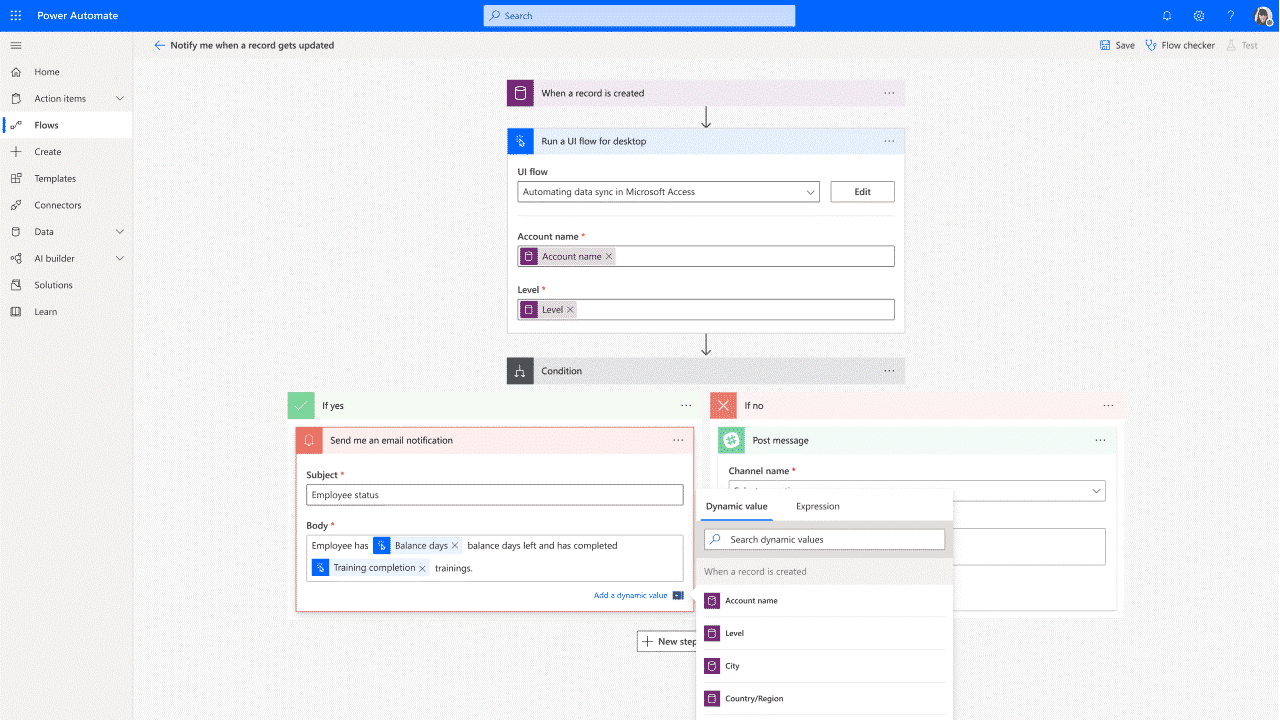

In Power Automate, you can use AI authoring, insights, processing and generation to optimise your business automation and create workflows with the assistance of CoPilot.
Power Automate can connect to a wide range of data sources. One of the most frequently used is the advanced integration tool which connects to over 1000 out-of-the-box data sources.
With these integrations you can create flows directly from most list, card or document pages.

Power Automate houses a range of benefits to optimise your organisations processes. Such as the following:
From fully automated to human interaction automation. With desktop flows you can do it all.
Using digital process automation you can run automation processes on services running in the cloud.
Providing automation in transparency in work, opportunity identification and reporting. Removing some of the manual processes in your organisation, saving you time.
Reliable automation, admin at scale and seamless incorporation into your organisations existing solutions.
Accelerate your digital transformation with automated applications, websites and more in the Microsoft Power Platform
How can the Power Platform help with regulatory compliance and audit readiness?
You can build apps or flows that enforce data access rules, log actions, rquire approvals, and build reports/audits from data stored centrally, helping you meet regulatory obligations.
Can the Power Platform help non-tech teams build their own tools?
Absolutely. Teams in operations, HR, membership, fundraising etc. can create apps or automations that match their workflows without waiting for IT.
How does adoption work for the Power Platform internally?
Adoption involves training, change management, champions within teams, good documentation and starting with small wins. Once people see how useful the tools are, uptake grows.
How does the Power Platform help with data visualisation and reporting?
Using Power BI, you can create interactive dashboards, embed visuals in other apps or portals, share insights across teams and monitor metrics in real time, reducing manual report generation.
What AI features are included in the Power Platform?
AI features include things like sentiment analysis, predictive insights, Copilot support for generating formulas or logic, and suggestions for automation. For example you can get alerts when data anomalies appear.
Can the Power Platform integrate with our existing systems?
Yes. It supports connections to many data sources: databases, existing Microsoft systems, third-party APIs, and even legacy systems. You can pull in and send out data so you don’t lose what you already have.
How quickly can you build something using the Power Platform?
Depending on complexity: a simple app or dashboard might be up in a few days; automations or more integrated solutions take longer. The design, data sources and dependencies affect speed.
What does “low-code / no-code” mean in The Power Platform?
It means you don’t need to be a professional coder to build dashboards, forms or basic apps. Many tools use drag-and-drop interfaces, familiar formula-like logic and pre-built templates.
How does using multiple Power Platform tools together amplify value?
When you combine tools (for example Power BI visualisations, Power Apps input forms, and Power Automate flows), the result is more than the sum of parts: automation kicks in, data becomes accessible, and you reduce delays and manual handoffs.
Why use the Power Platform across the business?
Because many departments have data in silos, repetitive tasks, or reporting that’s slow or manual. The Power Platform helps you bring data together, automate workflows and visualise insights to make decisions faster.
What do we mean when we say The Power Platform?
The Power Platform is Microsoft’s suite of tools (Power BI, Power Apps, Power Automate, Power Pages) that let organisations build solutions, dashboards and automations with little to no coding knowledge. It lets every department get more out of their data and drive efficiency.
The Little Princess Trust (LPT) identified the need for digital transformation, which would take the form of a system encompassing almost all areas of the organisation. The system needed to be intuitive, integrate, consolidate and create a sustainable and extensible solution for use well into the future.
over 13 years
years
To find out about how we create systems around the Microsoft D365 platform or to ask us about the specific industry focused digital management systems we create, get in touch.
Tel: 01432 345191
A quick call might be all you need, but just in case it isn’t, we’re happy to go a step further by popping by to see you.
We travel all over the UK.
Just ask.